How do I connect my Telegram channel and Telegram group to social posters?
Introduction
Telegram is a powerful tool for community building, support and content marketing. Social Poster lets you automatically post posts to your Telegram channel and group and keep your community active.
1. Benefits of connecting with social posters:
✔ Automatic posting in your telegram
✔ Increased reach and better community interaction
✔ Planning and manage your content directly in social posters
✔ Time savings through automation
2. Requirements
Before you can connect Telegram to social posters, make sure you meet the following requirements:
✅ You have an activeTelegram accountand are logged in to the Telegram web app or smartphone app
✅ You either have an existingTelegram channel/Telegram groupOr create a new one.
✅ You need oneTelegram-botWhich you create through the BotFather in Telegram.
✅ You have to use the bot asAdminAdd to your Telegram channel and join the group as a member.
Note:Your Telegram bot can only post in channels if it isAdministrator with post-permissionswas added.
3. Step-by-step instructions for connection
How to connect your Telegram channel to social posters
Step 1: Add Telegram account to social poster
1 Sign in to Social Posterand navigate toAccount Manager. .
2 Click onAdd a new accountand chooseTelegramfrom the list.
Step 2: Log in to the Telegram webapp
3 OpenTelegram Webin your browser or click on „Create Telegram Bot as seen above in the image above. Here the steps are listed again.
Step 3: Creating a Telegram bot with BotFather
5 Open Telegramand look forBotfatherin searchbar. Choose the one with the blue hook! Or you have already been redirected to the right one via the link in the social poster.
Send the order/newbot, and click Enter to create a new bot.
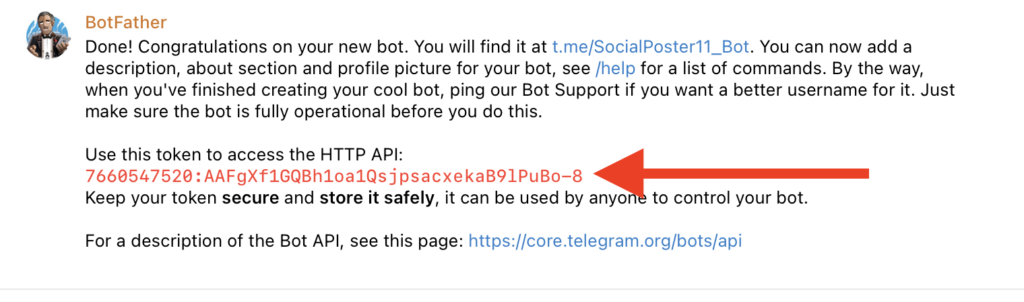
BotFather now generates oneApi copy thisAPI tokensIt will later be inserted into social posters.
Step 4: Create channel or use existing channel
If you don’t have a channel yet,Create a new Telegram channelin the Telegram app or in the Telegram web app.
Open them to open themTelegram channel settingson the smartphone or in the web app.
Looking for this.User-Namen of your bot you forgave before (in my example SocialPoster11_bot)Add him as an admin.
Give to the botPermissions to post. .
Click on 1agan Add Telegram. .
Confirm the connection Your Telegram channel is now successfully linked to social posters!
If this error message comes to you after adding, you must first post once in your new or existing channel – directly in the Telegram app or web app. An image or video with text should be posted. No matter what you write, it only needs to be posted once in the channel now. With the profile you are currently logged in to Telegram as an admin. Not with social posters, but directly in the Telegram app.
4. Possible problems & solutions
❌Error message: Invalid API token
➡Solution:Make sure you have the API tokenCopied correctly from BotFatherhave.
❌My bot cannot post
➡Solution:Check if the botAdmin permissionsin your Telegram channel.
❌Channel is not recognized in social posters
➡Solution:Sometimes it takes a few minutes for Telegram to adopt the changes. Wait briefly and try again.
5. Special hints
With this bot you can inPost channels and groups: For the groups you must create the bot as a member.
- Search for the bot’s user name again and add it.
- Copy the created token of Telegram in the social poster at Telegram group „Enter access tokens“ and save it. Now you can also post in Telegram groups with this create bot.
Posts are only visible to subscribers: Make sure your channel is publicly accessible or audience through the link.
Videos and GIFs can be posted: Social Poster supports text and image posts as well as videos and GIFs.
Tip:If you have multiple Telegram channels, you can manage them with different bots and organize them in social posters. Or add a bot to several channels.
Schreibe einen Kommentar