How do I connect my TikTok profile to social posters?
Introduction
TikTok is one of the fastest growing social media platforms, offering companies, content creators and brands the opportunity to reach a broad audience through creative short videos. By integrating TikTok with social posters, you can efficiently plan and publish your content automatically without having to log in manually each time.
1. Benefits of connecting with social posters:
✔ Automatically post videos on yourTikTok-Business
✔ Pre-planning posts for a consistent content strategy
✔ Unified management of social media channels
✔ Time savings through automation
2. Requirements
Before you can connect your TikTok account to Social Poster, make sure the following requirements are met:
✅You need a TikTok business accountPrivate accounts cannot be connected.
✅You need a Social Poster Premium or VIP packageYouTube is not included in the Social Poster Business package.
✅Permissions for TikTok must be authorized through the TikTok developer platform.
✅Your TikTok account must be linked to social posters through the API.
Note:TikTok currently only allows third-party tools to post regular feed videos. Livestreams and story posts cannot be published automatically.
3. Step-by-step instructions for connection
How to connect your TikTok account to social poster
Sign in to Social Poster and navigate to the Account Manager.
Click Add TikTok API Profile in the left account list or on „Add Account“ in theTikTok API profilesField right.

You will be redirected to the TikTok developer platform. Log in with your TikTok account if you haven’t already.
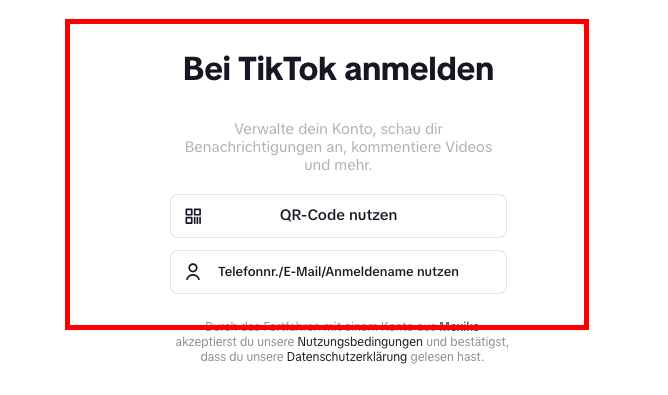 TikTok will show you a permission request. Confirm all necessary permissions so that Social Poster can publish videos for you.

Choose yours.TikTok-Businesswhat you want to connect.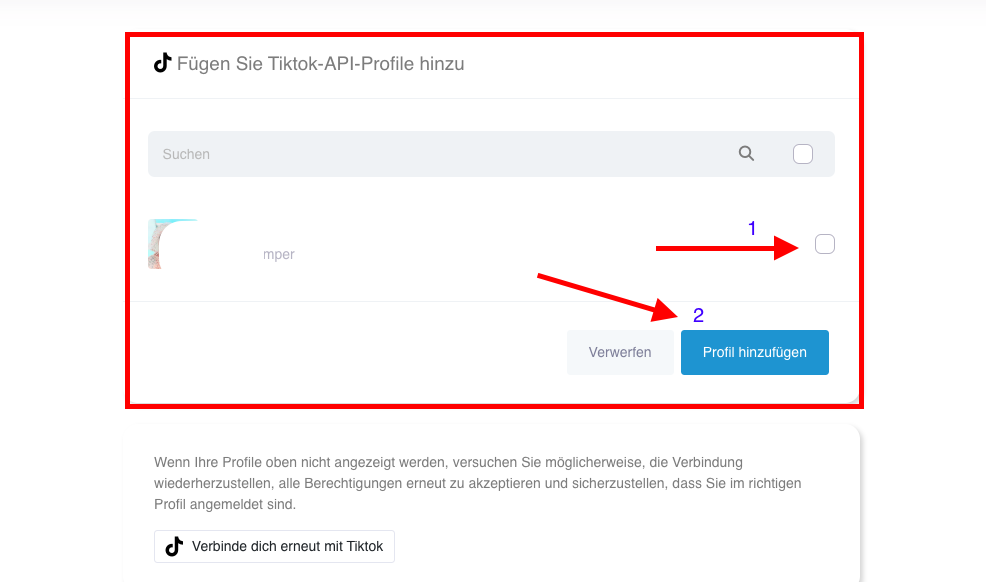
„Click onAdd profileThe connection is now established!
4. Possible problems & solutions
❌Error message: TikTok account not found
➡Solution:Make sure you have aTikTok-BusinessSocial posters are allnecessary permissionswere granted.
❌Videos are not published
➡Solution:Check if your TikTok account is stillConnectedIt is and whether youAPI access rightshave correctly granted.
❌Connection is regularly disconnected
➡Solution:TikTok demands oneAgain confirmationafter a certain time. Log in again in to social posters and reconnect. We’ll send you an email should that happens.
❌Error message: Permissions missing
➡Solution:Check if you all requestedAuthorizations grantedand your account is correctly set up as a business account.
5. Special hints
Only TikTok business accounts can be connectedPrivate or Creator accounts are not supported.
Automated interactions such as likes, comments or direct messages are not possible. .
Regular connection renewal requiredTikTok uses security measures for third-party tools.
Tip:If you manage multiple TikTok accounts, you can also connect them to social posters and manage them in the dashboard.
Schreibe einen Kommentar