The Mass contribution feature gives you the opportunity to use a large number of social
Create and schedule media posts efficiently and in a single step. It is ideal for users who want to prepare multiple posts simultaneously, e.g. B. for campaigns, series posts or recurring content. There is also the possibility that vendors, for example, provide their affiliates with such a CSV in order to simply post their contributions without much effort.
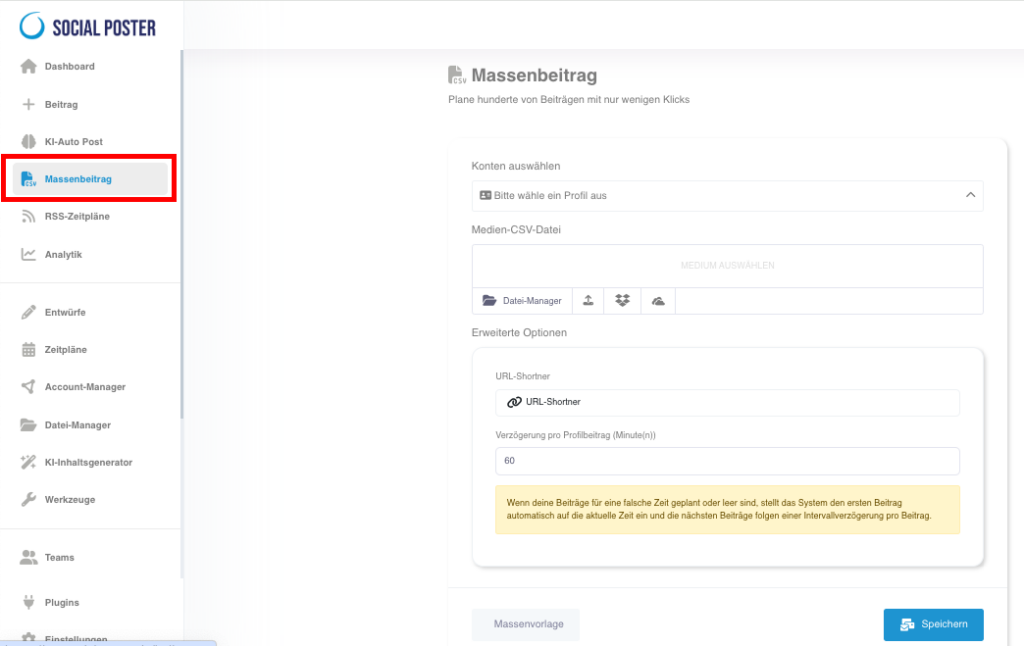
4.1 What is the mass contribution?
- Definition:A feature that uploads posts from a CSV file and
can be imported automatically into the system. - Main benefits:
- Time savings:Create and schedule hundreds of posts in one step.
- Efficiency:Avoid manually creating each post.
- Scalability:Perfect for large social media campaigns with numerous
content.
4.2 How does mass contribution work?
- Download CSV template:
- Download a pre-built template directly from the bulk contribution function.
- The template contains columns for important content such as text, links, images, and publication times.
- Fill CSV file:
- Insert the content into the appropriate columns:
- Text: The content of the post.
- Image/Video: The file name or URL of the media (if hosted externally).
- Links: URLs to external resources (optional).
- Time: Date and time when the post is to be published.
- Note the specific requirements in the template, e.g. B. maximum character numbers or supported file formats.
- Insert the content into the appropriate columns:
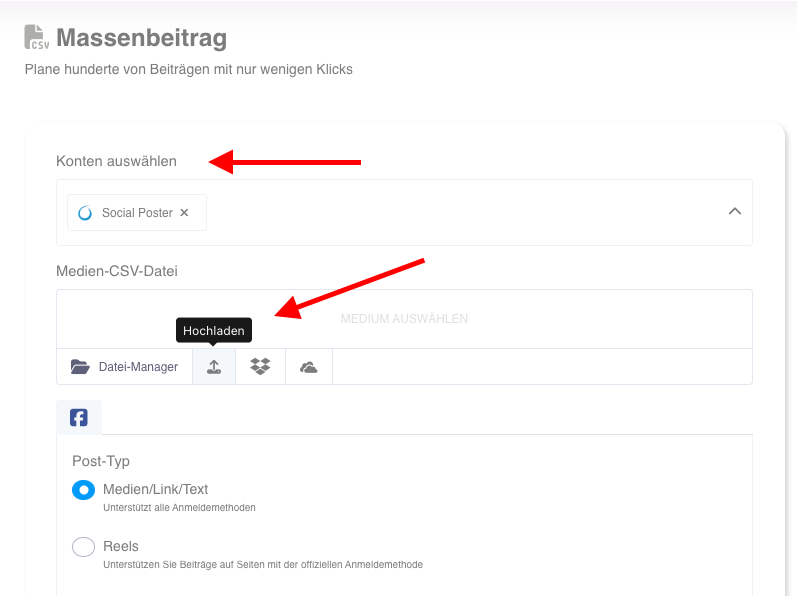
- Upload file:
- Import the completed CSV file into social posters.
- Choose which social media profiles you want the posts to receive.
- Automatic processing:
- The software processes the file and automatically creates all specified
contributions. - The posts appear in the queue where you check them
and can adjust.
- The software processes the file and automatically creates all specified

4.3 Advanced functions
- URL-short:
- Short long links directly during CSV upload.
- Set delay:
- Determine how much time between individual posts are published
It should pass away to avoid spam.
- Determine how much time between individual posts are published
- Media from the library:
- Use media from your file manager or upload new images and videos.
- Reusable templates:
- Save frequently used CSV files as a template for future campaigns.
4.4 Common use cases
- Campaign planning:
- Schedule posts for a specific campaign, e.g. B. for a discount campaign, one
Product launch or publicity.
- Schedule posts for a specific campaign, e.g. B. for a discount campaign, one
- Series posts:
- Create content for recurring topics such as Motivational Monday or Throwback Thursday.
- Blogs promotion:
- Share multiple blog articles with individual teasers and links.
- Seasonal content:
- Prepare posts for an entire month or quarter in advance.
- Affiliate templates:As a product manufacturer, you have partners who get a commission when they sell your product. Give them a pre-built CSV that only need to upload to promote your products.
4.5 Benefits of mass contribution function
- Speed:By mass importing you can contribute for several weeks
Create months in minutes. - Consistency:Keep your social media channels active and up to date
Stand. - Flexibility:Plan different content for different platforms, customized
to their specific requirements.
4.6 Tips for optimal use
- Carefully fill in CSV file:
- Make sure all columns are filled in correctly to cause errors during import
to avoid.
- Make sure all columns are filled in correctly to cause errors during import
- Perform test:
- Import a small test file to make sure everything is as planned
works.
- Import a small test file to make sure everything is as planned
- Save templates:
- Create templates for common campaign types to prepare preparation time
shortened.
- Create templates for common campaign types to prepare preparation time
- Optimize automation:
- Combine mass post with other features such as AI text generation to create content faster.
4.7 Frequently asked questions (FAQ)
- What do I do if CSV import fails?
- Check the file for typos, missing content, or incorrect formats.
- Can I edit the posts after import?
- Yes, all imported posts can be edited in the queue.
- How big can my CSV file be?
- The maximum file size depends on the number of posts and media files, but appears in the feature.
4.8 Practical tips
- Strategic planning:
- Use the bulk post feature to schedule posts for specific audiences or events in advance.
- Multiple-platform:
- Customize content in the CSV file to fit the different platforms.
- Regular update:
- Regularly revise old templates to consider current trends or changes in your strategy.
4.9 Benefits for companies
- Agencies:Manage posts efficiently and professionally for multiple customers.
- E-commerce:Plan extensive campaigns with product information and links
to your shop. - Content Creator:Save time by using serial content such as tutorials or
Created weeks in advance.
Mass contribution is an indispensable function to large amounts of social media
Create and publish content quickly and professionally. Through the intuitive
User interface and the flexibility of CSV files offers this function maximum
Efficiency and control over your social media strategy
Schreibe einen Kommentar