With the RSS schedules feature, you can automatically install content from RSS feeds on your
Share social media platforms. This feature is great for blogs, news websites, or other regularly updated sources to distribute content efficiently and without manual effort.
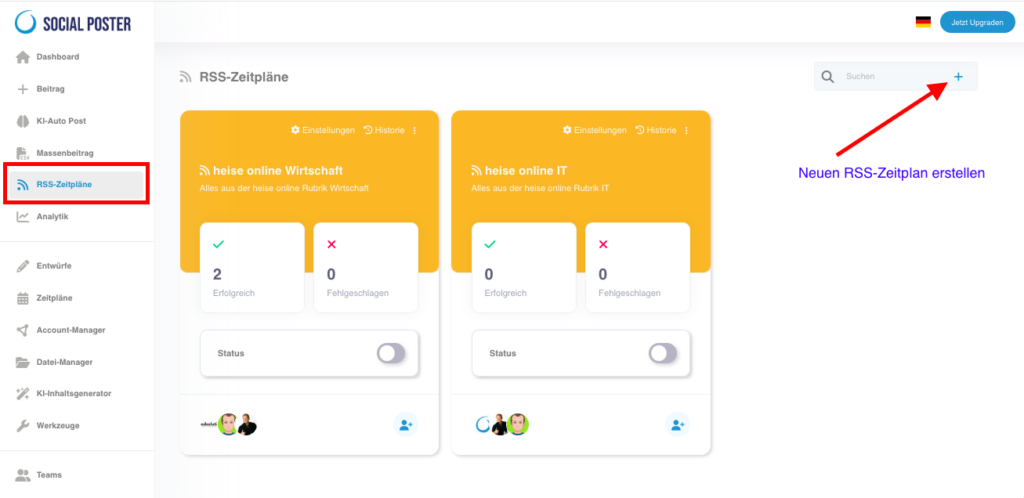
5.1 What are RSS schedules?
- Definition:RSS (Really Simple Syndication) is a format that creates new content from
Provided websites automatically. Social Poster uses these feeds to post from
to generate and publish the content. - Main benefits:
- Automation:Share content as soon as it is published without
manual intervention. - Consistency:Keep your social media channels active up to date
content. - Time savings:Automate the dissemination of articles, blog posts or
news.
- Automation:Share content as soon as it is published without
5.2 How do RSS schedules work?
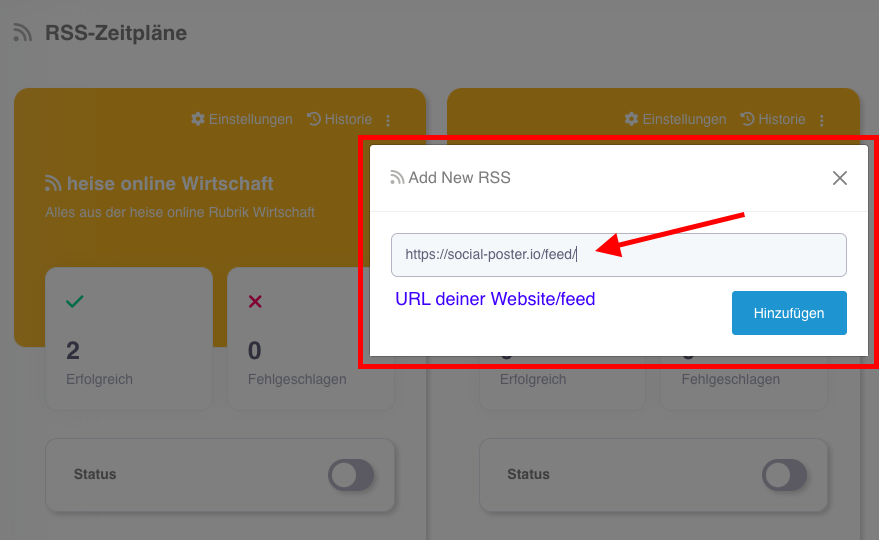
- Add RSS feed:
- Copy the URL of an RSS feed from a website (e.g. B. your blog or news platform).
- Insert the RSS feed into social posters.
- Create schedule:
- Select how often posts from the feed (e.g. B. hourly, daily, weekly).
- Note for entering the time value:
- 60 = once per hour
- 1440 = once a day
- 10080 = once a week
- Apply filters:
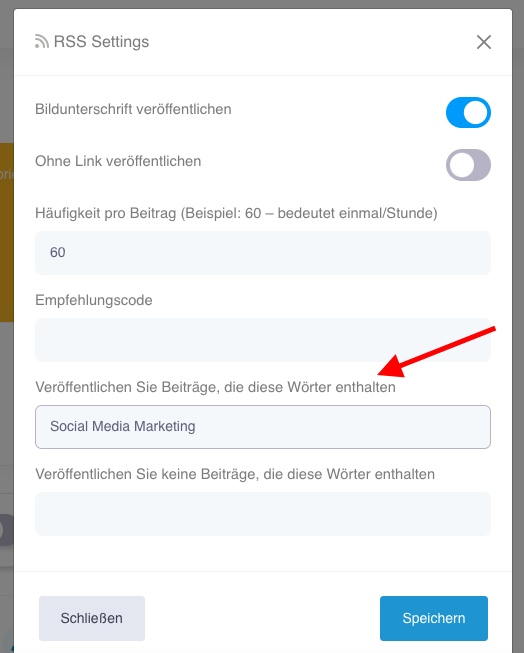
- Include keywords: Only posts with specific keywords are published.
- Exclude keywords: Prevent content from being posted with unwanted terms.
- Adaptation of contributions:
- Decide whether only the title or title with description will be published.
- Select whether you want an image from the RSS feed.

- Enable publication:
- Enable the schedule to automatically share content from the RSS feed on the linked social media platforms.

5.3 Advanced functions
- Image support:Decide whether images from the RSS feed along with the
Post should be posted. - Link-adjustment:Decide whether the link to the post should be published
Or not. - History:Check which posts have already been posted from the RSS feed.
5.4 Common use cases
- Blog promotion:
- Automate sharing new blog articles on your social media channels as they’re published.
- News-sharing:
- Share relevant news from trusted sources to keep your audience up to date.
- Industry updates:
- Spread content from industry expert RSS feeds to position yourself as a source of information.
- Community-management:
- Share content from partners or customers to strengthen collaboration.
5.5 Benefits of RSS schedules
- Efficiency: Automate the dissemination of content without manual effort.
- Relevance:Keep your channels up to date with current and interesting content
latest state. - Commitment:Deliver regular updates to your audience and win more
attention. - Flexibility:Customize the publications to your needs and the requirements of the platforms.
5.6 Tips for optimal use
- Select reliable sources:Use only RSS feeds from trusted and
relevant websites to ensure the quality of your posts. - Apply filters:Use keywords to share only relevant content that
Match your branding. - Regularly check:Occasionally check the contents of the feed to
Make sure they are still up-to-date and appropriate. - Supplement own content:Combine RSS feed content with your own
Contributions to create variety.


5.7 Frequently asked questions (FAQ)
- How do I find an RSS feed?
- Many websites offer RSS feeds. Look for the RSS icon or URL that ends with rss.xml. You can also google by RSS feed and industry.
- Can I add multiple feeds?
- Yes, Social Poster supports multiple feeds that you can schedule individually
- What happens if an RSS feed stops working?
- Social Poster indicates if a feed is faulty so you can review or update it.
5.8 Benefits for companies
- Agencies:Automate the sharing of customer content to improve their visibility
increase. - E-commerce:Regularly share new products or blog articles automatically.
- Media companies:Spread messages quickly and without manual effort.
5.9 Practical examples
- Blog operator:Automates sharing your articles on Twitter and Facebook to regularly direct new visitors to its website.
- A social media manager:Use RSS feeds from industry experts to
Provide your own target group with relevant information. - E-commerce shop:Automatically shares new product updates and offers
all platforms.
The RSS schedules feature is a powerful tool to continuously and
Efficiently share on social media. With the filter and customization options you can
Ensure that only relevant and high-quality posts are shared.
Schreibe einen Kommentar