Account Manager
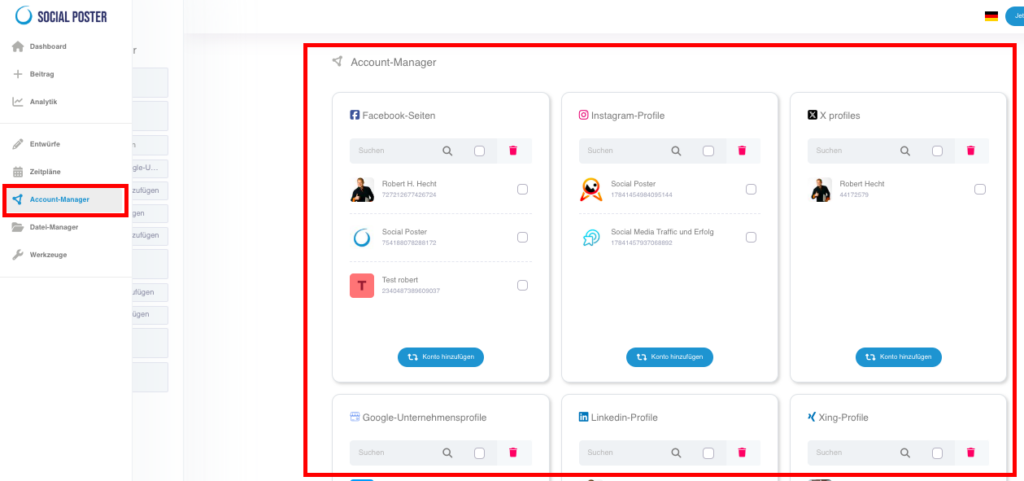
The account manager is the central place where you can manage all your social media accounts
can manage. This feature allows you to easily connect accounts,
Renew or remove connections so you can ensure that your
Posts will be published smoothly. Connect once and in the future only one
Login for all your social media platforms.
9.1 What is Account Manager?
- Definition:An interface that keeps all your social media accounts in one place
Summarize and make administration easier. - Main benefits:
- Efficiency:Manage all platforms centrally without having to account
have to register individually. - Flexibility:Add new accounts or remove old ones as needed.
- Error avoidance:Renew expired connections quickly and
Simple. If a connection has expired, you will receive from us
an email with the indication of which platform it is. Thus is
Ensure a smooth posting.
- Efficiency:Manage all platforms centrally without having to account

Account Manager has accounts for all major social media platforms
Add:
- Facebook:Pages and groups.
- Instagram:Business and Creator Profiles.
- Threads:Profiles for news and updates.
- X(formerly Twitter): Profiles for news and updates.
- LinkedIn:Personal profiles and company pages.
- TikTok:For short videos and creative content.
- YouTube:For video content, live streams and shorts.
- Google companies:For local SEO.
- Pinterest:Boards for visual content.
- Reddit:Community interactions.
- Tumblr:For creative and blog-like content.
- Telegram:Channels and groups.
- Xing:News for your business network.
9.3 How does Account Manager work?
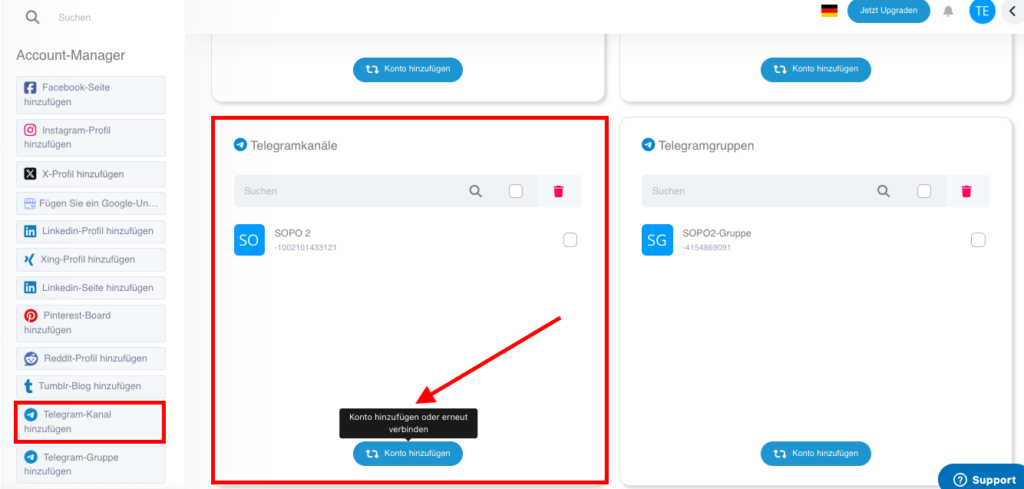
- Add account:
- Click on the Add Account button.
- Select the platform you want to connect.
- Follow the instructions on the screen:
- Log in with the credentials of the respective account.
- Give the necessary permissions for social poster posts
can post.
- Manage connections:
- Active accounts:See all currently connected accounts in an overview.
- Renew:Click on an account to renew the connection if it has expired.
- Remove:Remove accounts that are no longer needed by highlighting them and clicking on the Trash icon.
- Notifications for problems:
- Social Poster informs you by email when a connection has expired or needs updating.
- Incorrect connections appear as a problem in schedule.
9.4 Advanced functions
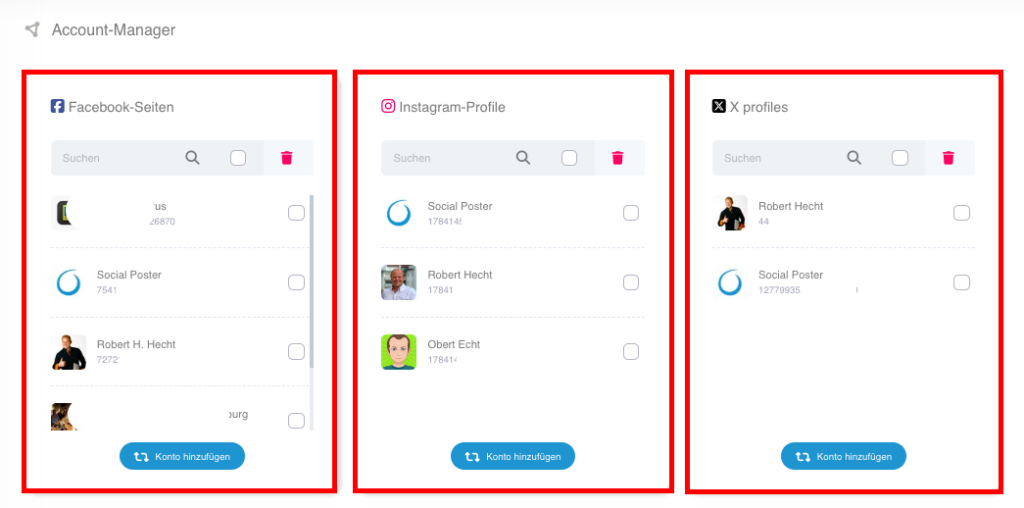
- Multiple accounts per platform:
- Add multiple accounts for the same platform (e.g. B. multiple Facebook pages or Instagram profiles).
- Group management:
- Wise accounts of certain groups (e.g. B. customers or projects) to keep track.
9.5 Common use cases
- Agencywork:
- Manage the social media accounts of multiple customers clearly and
a place.
- Manage the social media accounts of multiple customers clearly and
- Rebranding:
- Add new accounts when brands are updated or new channels open.
- Teamwork:
- Make sure all the accounts you need are available for your team’s posts.
- Troubleshooting:
- Quickly update expired connections to avoid publishing issues.
9.6 Benefits of Account Manager
- Time savings:Manage all accounts centrally without constantly logging in individually
must. - Error avoidance:Proactively renew compounds before problems occur.
- Flexibility:Add new platforms or profiles at any time.
- Safety:Control what permissions Social Poster has on the platforms.
9.8 Frequently Asked Questions
- What happens when a connection expires?
- Social Poster informs you by email and gives you the opportunity to renew the connection.
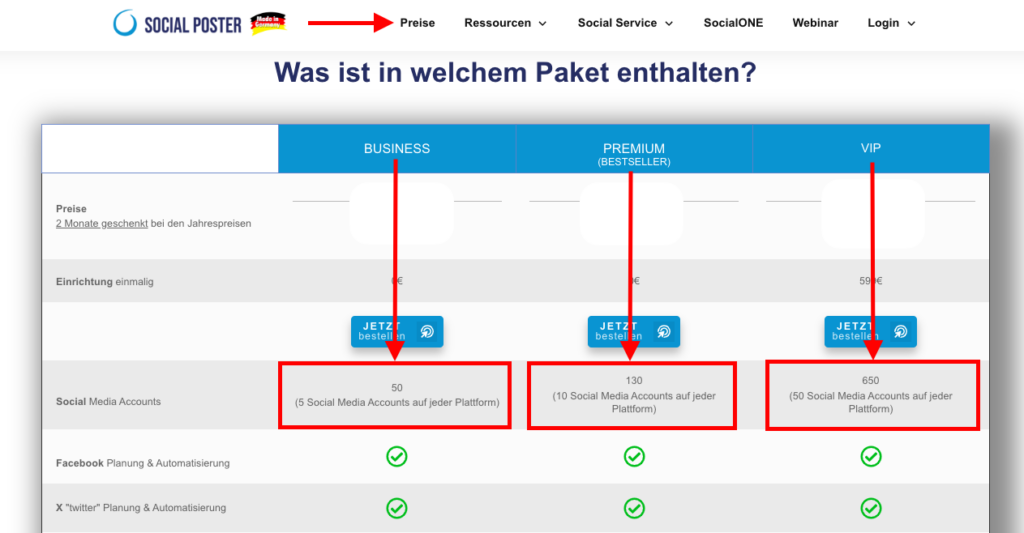
- How many accounts can I connect?
- It depends on your social poster package. Look at itThis pageafter.
- Can I connect private and business accounts?
- Yes, both types of accounts are supported as long as they meet platform requirements.
- Can I change permissions afterwards?
- Yes, you can update permissions in the platform’s account settings.
9.9 Practical examples
- A small company:Connects Facebook, Instagram and Google
Company profiles to address local customers. - Social media agency:Manage 20+ accounts for different customers in a central overview.
- A content creator:Uses multiple YouTube and TikTok accounts to target different audiences.
9.10 Benefits for companies
- Agencies:Manage customer accounts efficiently without being individually on each platform
have to register. - E-commerce:Make sure your accounts are always ready to create new
Promote products or promotions. - Content Creator:Keep track of all linked platforms and
Optimize your publishing workflow.
The account manager is an indispensable feature to maintain your social media presence
to manage smoothly. With its centralized structure and flexible
It offers maximum control and efficiency.