AI content generator (from PREMUIM)
The AI content generator is an innovative tool in social posters that uses
artificial intelligence (AI) creates appealing texts for social media posts. The feature is ideal for generating creative, informative and targeted content – quickly and efficiently.
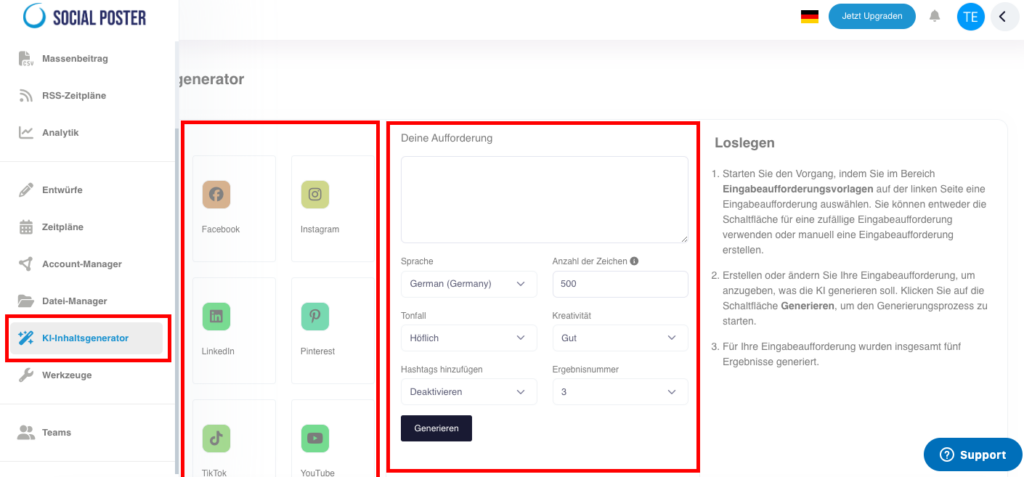
11.1 What is AI content generator?
- Definition:A text generator that automatically creates content for social media posts based on prompts.
- Main benefits:
- Time savings:Generate texts in seconds.
- Creativity:AI provides fresh and original ideas.
- Flexibility:Customize language, tonality, and text length to your audience and platform.
11.2 How does AI content generator work?
A. Creating content
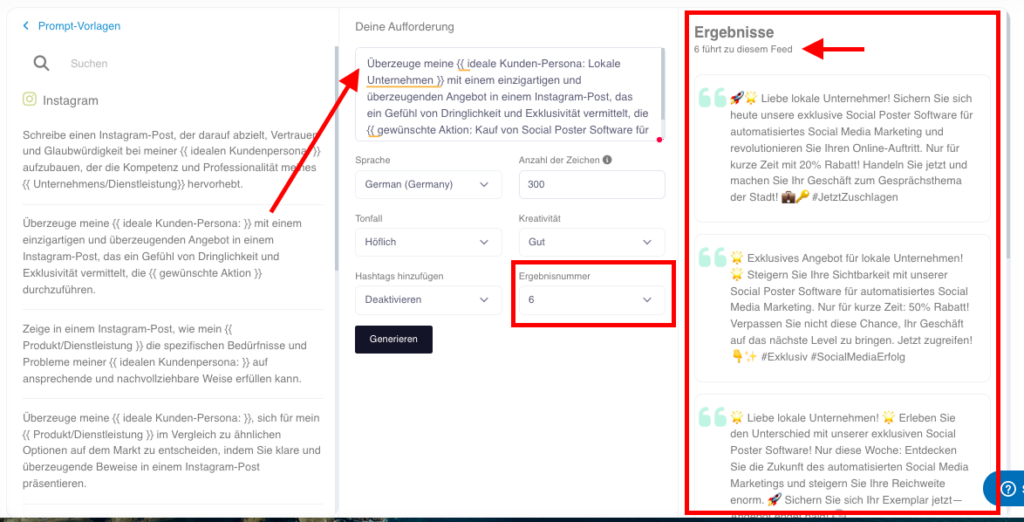
- Enter promptly:
- Write a short instruction, e.g. B.:
- Make a motivating contribution about the benefits of
Teamwork. - Write a humorous text about the challenges of home office.
- Make a motivating contribution about the benefits of
- Write a short instruction, e.g. B.:
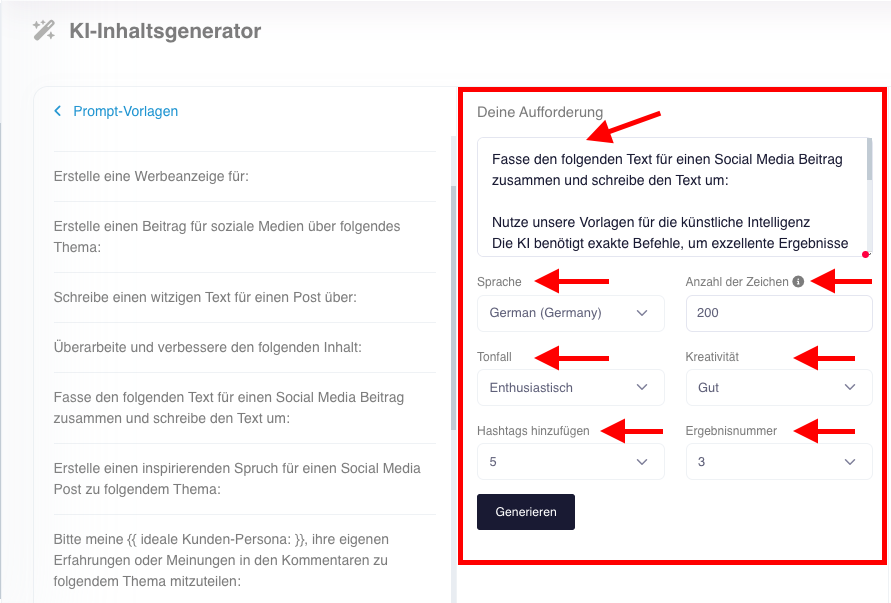
- Set parameters:
- Select the language
- Select the tonality:
- Polite:For formal contributions.
- Funny:For informal and friendly content.
- Enthusiastic:For motivating posts.
- Friendly: For fun content.
- Informatively:For factual contributions, clear and structured
- Funny:For humorous content that attracts attention
- Add hashtags
- Select the number of characters
- Creativity:
- Economically
- Normal
- Good
- Premium
- The number of desired results
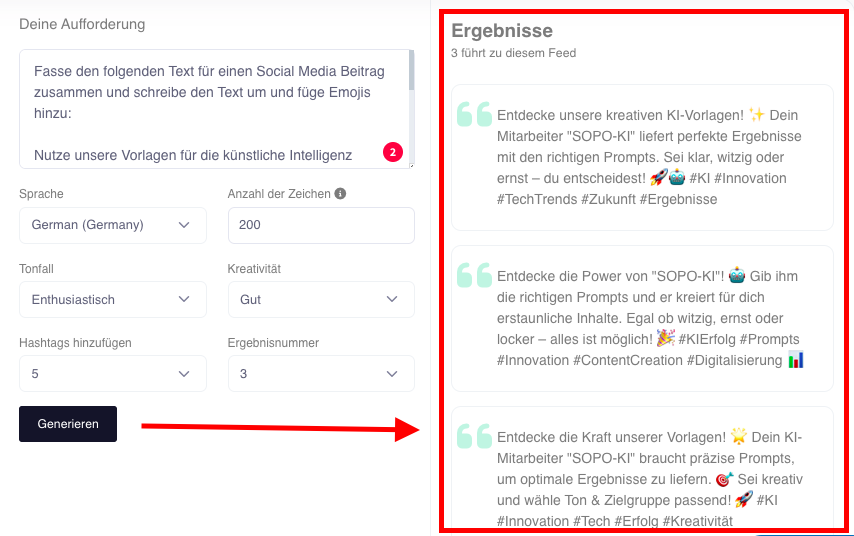
- Generate text:
- Click Generate, and AI will create full text according to your settings in seconds.
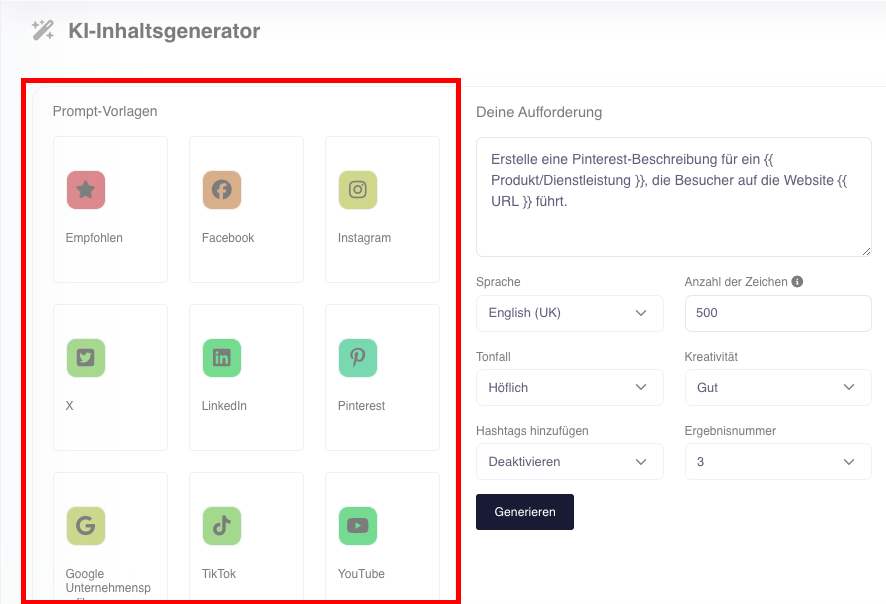
- Use our prompt templates:
- Recommended:General Prompts for social media texts
- Facebook:Prompts specially optimized for Facebook
- Instagram:Prompts optimized specifically for Instagram
- X (formerly Twitter):Prompts specially optimized for X
- LinkedIn:Prompts specially optimized for LinkedIn
- Pinterest:Prompts specially optimized for Pinterest
- Google companies:Prompts specially optimized for Google My Business
- TikTok:Prompts optimized specifically for TikTok
- YouTube:Prompts optimized specifically for YouTube

B. Edit texts
- Live-editing:Change the generated text directly in the editor.
- Duplication:Create variants of the text for different platforms.
- Cache:Save generated content in Text Manager for reuse later.
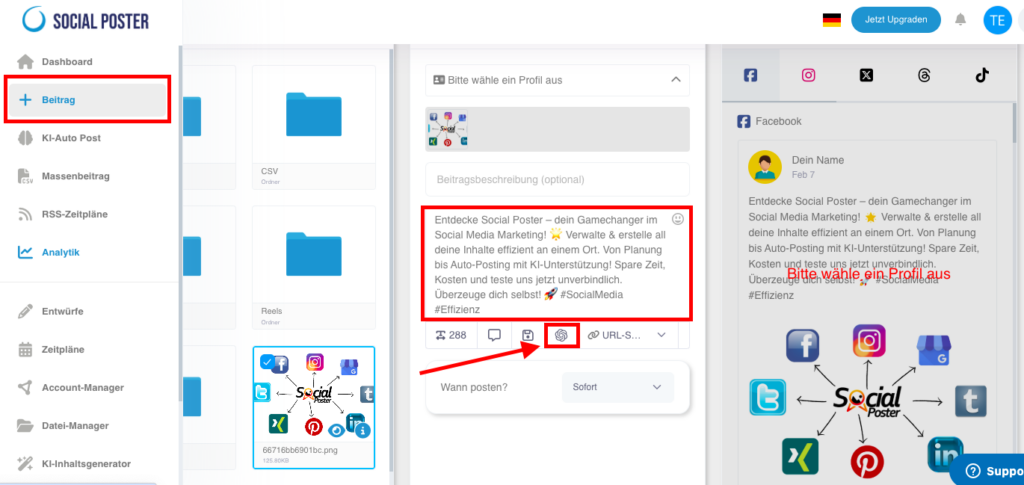
C. Integrate texts
- Paste the generated text directly into your social media posts.
- Combine the text with media from File Manager.
11.3 Advanced functions
- Hashtag generation:
- Automatically create relevant hashtags based on text content.
- Platform optimization:
- Customize the content to specific requirements of the platforms
11.4 Common use cases
- Developing content ideas:
- Have AI generate suggestions for new topics or series posts.
- Save time:
- Create engaging posts for multiple platforms in minutes.
- Support campaigns:
- Use AI to create texts for a product campaign or event.
- Local adjustments:
- Customize content to different regions or audience, e.g. B. with localized prompts.
11.5 Benefits of AI content generator
- Efficiency:Generate texts faster than ever before without sacrificing quality.
- Creativity:AI offers fresh ideas if you don’t have inspiration yourself.
- Consistency:Create posts that fit your brand style.
- Flexibility:Optimize texts for different platforms and audiences.
11.6 Tips for optimal use
- Use precise prompts:
- The more accurate your instructions, the more appropriate the results.
- Test several variants:
- Generate multiple versions of text and select the best one.
- Platform requirements:
- Customize the length and style of the text to the target platform.
- Combine:
- Complement the generated texts with your own ideas or visual
content.
- Complement the generated texts with your own ideas or visual
11.7 Frequently Asked Questions
- Can I customize the texts?
- Yes, you can edit the generated texts directly in the editor.
- How many texts can I generate?
- There is no limit, you can generate as many texts as you
Needed.
- There is no limit, you can generate as many texts as you
- Which languages does AI content generator support?
- The generator supports several languages, including German, English, Spanish and French.
- Can I save the text?
- Yes, you can save generated content in Text Manager and reuse it later. You can also generate and save the texts directly in Text Manager with the AI Content Generator.
11.8 Practical examples
- A content creator:Use AI content generator to
Create captions for Instagram. - Marketing team:Develops texts for a new product campaign with a
uniform style. - An agency:Generates several text variants that are then coordinated with customers.
11.9 Benefits for companies
- Agencies:Offer customers faster content ideas and reduce
cost creation. - E-commerce:Create product descriptions and promotional texts in no time.
- Content Creator:Stay creative and productive even when you run out of ideas.
11.10 Visual guidance for AI content generator
- Creating text
- Step 1:Open AI content generator in menu.
- Step 2:Enter a prompt, e.g. B. Create a post about the benefits of
Social media marketing or select one of our prompt templates. - Step 3:Select tonality and text length.
- Step 4:Click on Create to create the text.
- Edit text
- Edit the text directly in the editor.
- Add e.g. B. Add hashtags or call-to-action.
- Save the text or add it directly to a post.
- Save text
- Click Save to store the text in Text Manager.
- Organize saved texts by topic or campaign.
The AI content generator in social poster is an indispensable tool for anyone who
Create social media content faster, more creatively and purposefully. With his
Flexible functions and easy operation make content creation more efficient
than ever before.